


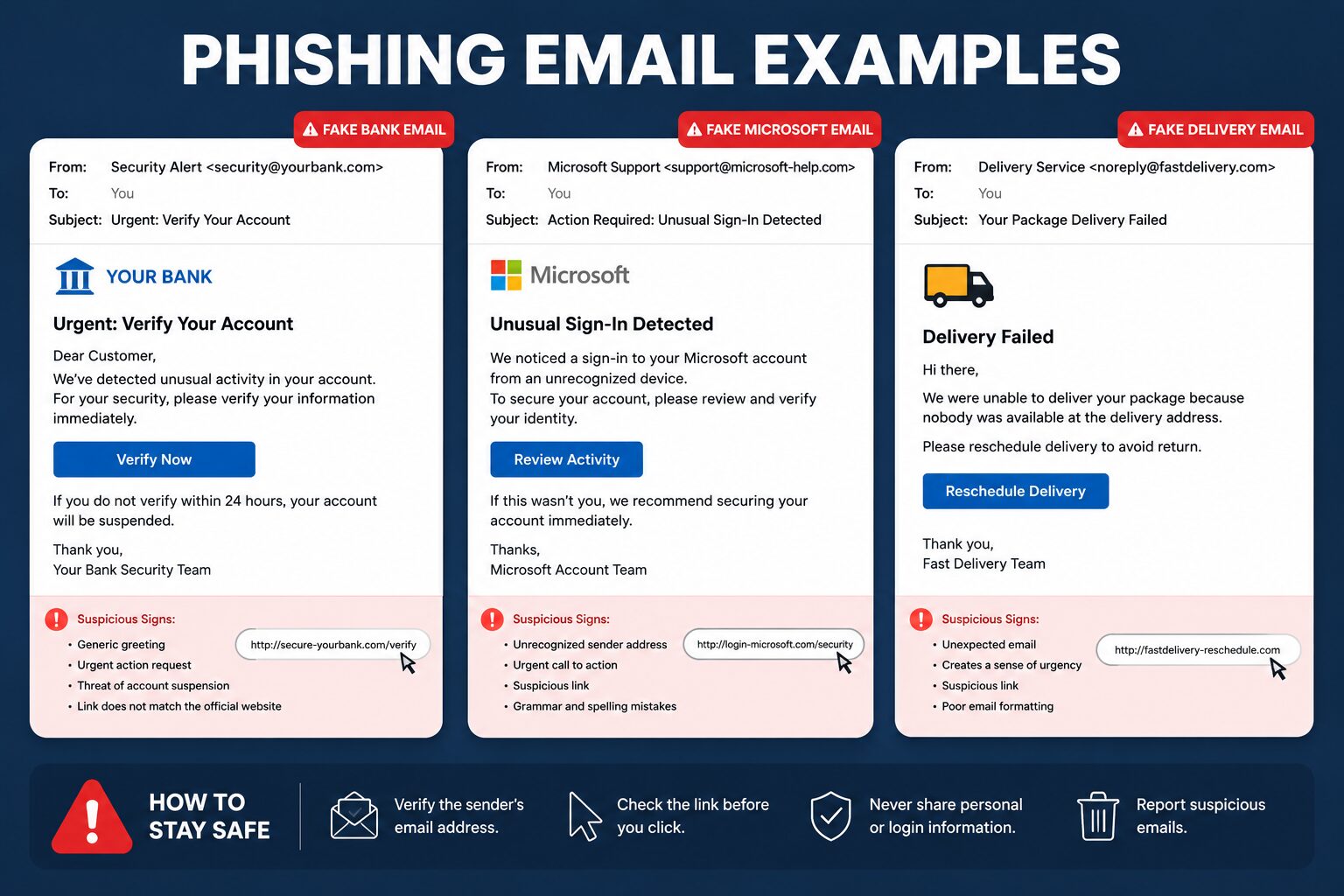
Picture this. You get an email from Microsoft saying your account needs a quick security check. You click through, the page looks exactly right, your browser doesn’t flag anything, and you sign in like normal. Nothing about it feels off. That’s the problem. The phishing email examples most people were trained on- typos, weird sender addresses, an urgent Nigerian prince- aren’t the ones causing the most damage anymore.
The FBI’s Internet Crime Complaint Center logged 193,407 phishing and spoofing complaints in 2024 alone, and reported losses tied to phishing nearly quadrupled year over year to around 70 million dollars. That’s before counting business email compromise separately, which added another 2.77 billion dollars in losses on its own. Phishing hasn’t gotten less common. It’s gotten harder to spot.
The Classic Signs People Already Know
Most existing guides on this topic spend most of their length on signs that are genuinely still useful, just not the whole picture anymore. A mismatched sender address is still a real tell. If someone signs off as your CEO but the reply-to address is a Gmail account instead of the company domain, that’s worth a second look every time.
Urgency is another one worth naming specifically. I’ve seen this play out with a fake invoice email that gave someone exactly 45 minutes to approve a wire transfer before “the vendor cancels the order.” That kind of artificial time pressure is designed to short-circuit the moment where you’d normally stop and verify something.
Generic greetings, awkward phrasing, and a link that displays one URL but points somewhere else when you hover over it are all still real signals. They just don’t catch the more sophisticated attacks anymore, and treating them as a complete checklist is where a lot of training programs fall short.
Why the Old Checklist Isn’t Enough Anymore
This is the part most coverage of phishing email examples skips entirely, and it’s the actual reason sophisticated attacks keep working even on people who know what to look for. Some of the most damaging recent campaigns don’t rely on a fake login page at all. They redirect victims through legitimate OAuth consent screens, real Microsoft or Google login pages, and then ask the victim to grant permissions to a malicious third-party app instead of typing a password anywhere.
That completely defeats the classic advice to “check if the URL looks right,” because the URL genuinely is right. You’re on the real login page. What you’re not checking is which app you just gave access to your inbox, your files, or your calendar. One documented 2026 campaign attributed to a Russia-linked group used exactly this approach, sending Entra ID OAuth links that led to authentic Microsoft pages, which meant standard suspicious-domain warnings never triggered at all.
CAPTCHA-gated phishing pages work on a similar principle. Making someone solve a puzzle before the fake page loads doesn’t protect them; it trains them to associate that extra friction with legitimacy, since real security checks often look and feel the same way.
What These Attacks Actually Look Like in Practice
A few real-world patterns show up again and again, and it helps to know the shape of each one rather than memorizing a fixed template, since attackers change the wording constantly.
The fake document share is common. An email says a file has been shared with you on Google Drive or Dropbox, complete with a working-looking preview thumbnail, and the link leads to a credential harvesting page that may sit on infrastructure that looks disturbingly close to the real thing.
CEO fraud follows a predictable shape too. A message appears to come from an executive, often while they’re “traveling” and hard to reach by phone, asking someone in finance to process an urgent wire transfer or purchase gift cards. The email account itself might even be genuinely compromised rather than spoofed, since attackers increasingly hijack real internal email threads and insert a fraudulent request partway through an existing conversation.
Vendor email compromise works the same way from the outside. Instead of impersonating your own company, the attacker compromises an actual supplier’s email account and sends a completely normal-looking invoice from a real, previously trusted address, just with updated bank details.
The Numbers Behind Why This Keeps Working
It’s worth being honest about scale here instead of treating phishing as an abstract inconvenience. Business email compromise losses reached 2.77 billion dollars in 2024 according to the FBI’s IC3 report, and that’s just the cases people actually reported. The report itself notes that a large share of victims never file a complaint at all, so the real total is almost certainly higher.
What makes BEC specifically dangerous is that it often skips malware and malicious links entirely. It’s built on trust and routine, a familiar name, a normal-seeming request, timed to land when someone’s moving fast. That’s genuinely harder to filter automatically than an email full of misspellings, which is part of why the financial damage keeps climbing even as awareness training becomes more common.
What to Actually Do When You Spot One
Most articles stop at “here’s how to spot it” without covering what happens next, which leaves a real gap. If you’re at a company with an IT or security team, forward the email to them directly rather than just deleting it, since one report can help flag a broader campaign hitting other employees too.
If you’ve already clicked a link or entered credentials, change the password immediately from a separate, trusted device, and check whether multi-factor authentication is still enabled on the account, since some phishing kits specifically try to disable it during the attack. For OAuth-style attacks, check your account’s connected apps or third-party access list and revoke anything unfamiliar, since that’s the part a password reset alone won’t fix.
If money was actually transferred, contact your bank immediately and ask about a wire recall, then file a report with IC3 at ic3.gov. Acting within the first 24 hours meaningfully improves the odds of a successful fund recovery, since banks have a limited window to intercept a fraudulent transfer before it clears internationally.
Where Honest Uncertainty Actually Matters
No single check is foolproof, and it’s worth saying that plainly instead of pretending otherwise. Checking sender domains helps, but plenty of smaller companies legitimately use third-party email providers or slightly unusual domains for normal business reasons, so a domain that looks a little off isn’t automatically proof of an attack.
Similarly, not every urgent email is a scam, and not every generic greeting means fraud. Treating every red flag as absolute certainty leads to the same problem as ignoring them entirely, just in the opposite direction, since it trains people to distrust legitimate messages and slows down real work unnecessarily.
The One Habit Most Training Never Mentions
Here’s something genuinely useful that rarely shows up elsewhere. When you’re unsure about a request, especially one involving money or access, verify it through a communication channel the original message didn’t provide. Don’t call the phone number listed in the suspicious email itself, and don’t reply to the thread asking “is this really you?” Look up the person’s number independently, through your company directory or a previous, unrelated email, and ask them directly.
This works because it breaks the attacker’s control over the entire interaction. A convincing fake email can’t fake a phone number you already had saved from six months ago, and that one habit alone catches attacks that pass every other visual check.
Frequently Asked Questions
What’s the most common type of phishing email right now?
Business email compromise and vendor impersonation are currently the costliest, since they often skip obvious red flags like bad links or malware entirely, relying instead on a compromised or spoofed trusted contact asking for a routine-seeming payment or file.
Can a phishing email look completely legitimate with no errors at all?
Yes. Sophisticated 2026-era attacks increasingly use real login pages through OAuth consent screens, meaning the page itself is genuine even though the app requesting access isn’t, which is why URL checking alone isn’t a complete defense anymore.
What should I do if I already clicked a phishing link?
Change your password immediately from a different device, check whether multi-factor authentication is still active, and review connected third-party apps on the account, since some attacks grant themselves ongoing access rather than just capturing a single password.
Is it worth reporting a phishing email if nothing bad happened?
Yes. Reporting it to IT or filing an IC3 complaint helps track broader campaigns even without a direct loss, and it may protect coworkers or other potential victims who receive the same message.
Why do phishing losses keep rising if awareness training is more common than ever?
Losses keep climbing partly because attackers have shifted toward methods that bypass traditional red flags entirely, like OAuth-based attacks and co
mpromised legitimate accounts, which standard “spot the fake” training doesn’t fully prepare people for.
